

AutoTuner or FLEX? Both systems let you work professionally with ECUs and TCUs via OBD, Bench and Boot, but they differ mainly in their licensing model, how you expand your workstation and how the entire ecosystem is organised. AutoTuner relies on a single, comprehensive hardware package with no mandatory annual subscription, while FLEX lets you choose licences and the range of supported applications in a more modular way. [1][5]
Key information:
- AutoTuner and FLEX both support ECUs and TCUs and offer OBD, Bench and Boot methods. However, the specific capabilities always depend on the particular control unit and the current protocol. [1][5]
- AutoTuner does not require a standard annual subscription for updates to the main tool. The manufacturer offers free updates and new protocols for the device you own. [2]
- FLEX uses a more modular licensing model. You can choose packages for ECUs, TCUs, specific processor families or heavy-duty vehicles, among others. [5][7]
- With FLEX, an annual subscription fee applies after the first year, depending on the software configuration. Some services require an active subscription. [6]
- Don't choose a programmer based solely on the number of supported vehicles. Compare specific ECUs and TCUs, available reading methods, backup, cloning, recovery and the scope of required licences.
AutoTuner or FLEX – what are the key differences?
The biggest difference is not that one programmer "can do tuning" and the other can't. What sets them apart is how the manufacturer organises the hardware, licences, updates and workstation expansion.
AutoTuner is offered as a complete tool for reading and writing ECUs and TCUs. The kit includes an OBD cable, universal Bench and Boot cables, a power supply, probes and the components needed to work directly with the control unit, among other items. The tool supports OBD, Bench and Boot within a single system. [1]
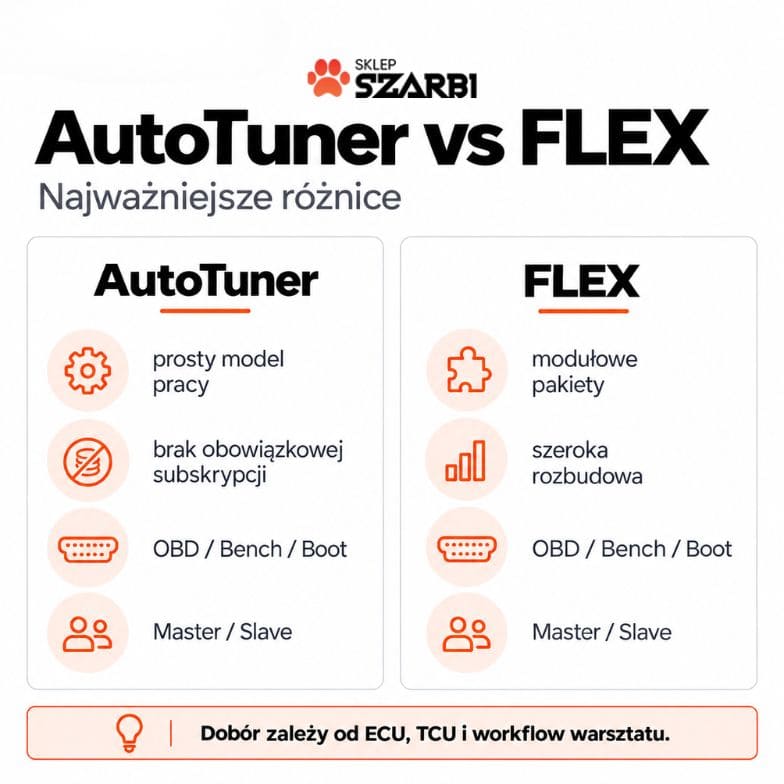
FLEX is also an ECU and TCU programmer supporting OBD, Bench and Boot, but its key feature is the ability to choose a specific software package tailored to your workshop's specialisation. Magic Motorsport offers separate configurations for ECU, TCU, Full, heavy-duty applications and specific processor families, among others. [5][7]
| Area | AutoTuner | FLEX |
|---|---|---|
| ECU | yes | yes |
| TCU | yes | yes |
| OBD | yes | yes |
| Bench | yes | yes |
| Boot | yes | yes |
| Master / Slave | yes | yes |
| Software model | wide range in a single tool | modular packages |
| Standard annual subscription for tool updates | none | applies |
| Specialised extensions | developed within the AutoTuner ecosystem | extensive system of packages and accessories |
The table shows how the systems work, not a ranking of their quality. Specific capabilities may change with subsequent updates.
Do AutoTuner and FLEX support the same ECUs and TCUs?
No. The compatibility lists partly overlap, but they are not identical.
This is probably the most important thing to check before buying.
It's not enough to confirm that both programmers support, say, Ford, BMW, VAG or Mercedes. What matters is the specific control unit, processor, hardware version and communication method.
For one ECU, both devices may offer OBD. For another, AutoTuner may offer Bench and Virtual Read, while FLEX provides full Bench with EEPROM. For yet another, the situation may be the other way round.
Magic Motorsport provides a filterable Vehicle List where you can check the ECU model, vehicle type, connection mode and required software package, among other things. [7] AutoTuner also maintains an up-to-date compatibility database, and its documentation shows the available methods for specific ECUs. [1]
Szarbi expert advice: prepare a list of the 20–30 controllers that most often come through your workshop. Only then compare AutoTuner and FLEX. The total number of vehicles in the database is far less useful than knowing that the programmer supports exactly your ECU and TCU.
How do AutoTuner and FLEX compare for OBD, Bench and Boot?
Both tools support all three basic communication methods, but the functions available in a given mode may differ. [1][5]
For example:
- OBD may offer a real read or a Virtual Read,
- Bench may allow Maps, EEPROM and Full Backup,
- Boot may provide access to memory that is unavailable by other methods,
- one of the modes may be used to unlock the controller beforehand.
In AutoTuner, a backup containing the MCU memories is created automatically during supported Bench or Boot reads. At the same time, the manufacturer's documentation states that a standard OBD read does not generate such a backup. [4]
FLEX also varies the scope of data depending on the protocol. For example, for the supported Bosch DQ500 Gen2, DQ38x Gen2 and ZF AL552 Gen2 TCUs, Bench mode covers Maps, Internal EEPROM and Full Backup. [8]
This shows why a "has Bench / doesn't have Bench" comparison is too superficial.
AutoTuner vs FLEX – how does the Master and Slave model work?
Both systems offer Master and Slave, but before buying you need to check the rules for working with files and for later migration.
In AutoTuner, the Master receives unencrypted files, which it can edit itself or pass on to a calibration provider of its choice. The Slave works on encrypted files assigned to a specific Master. [3]
FLEX uses a similar split. The Master version works on files in formats that allow further editing, while the Slave operates within the network of its assigned Master. Magic Motorsport additionally lets you build an extensive structure of Slave users within a Master account. [5]
If you don't calibrate files yourself, Slave may be the logical working model in both AutoTuner and FLEX.
If, on the other hand, you want to create your own calibrations, use several file providers or build your own workshop network, look at the Master versions.
Which programmer has the simpler cost model?
AutoTuner has a simpler update cost model, while FLEX lets you match the scope of software to your specialisation more precisely.
AutoTuner officially states that there is no mandatory subscription for tool updates. New protocols and standard updates are provided without an annual fee. [2]
This does not mean that paid services never appear anywhere in the ecosystem. For example, changing the assigned Master, upgrading a Slave to Master or advanced Master account services may be chargeable. [3]
With FLEX, the cost depends more heavily on the configuration. The manufacturer uses software packages, and the warranty terms indicate an annual subscription fee once a year has passed since activation. Its amount depends on your SW configuration. Some services require an active subscription. [6]
What should you calculate instead of just the purchase price?
Calculate at least:
- the cost of the Master or Slave version,
- the required ECU and TCU licences,
- subscription costs in subsequent years,
- cables and adapters for the most common controllers,
- map editing software,
- the cost of external files,
- the cost of any upgrade,
- specialised services required for some ECUs.
Only the total over 2–3 years shows the real cost of the workstation.
Is AutoTuner easier to start with?
AutoTuner may be easier to budget for and implement, because the basic kit includes a wide range of accessories and standard updates do not require an annual fee.
Among other things, the manufacturer supplies an OBD cable, a set of Bench/Boot cables, a power supply, Boot accessories and a carrying case with the device. The software guides the user through procedures with connection illustrations. [1]
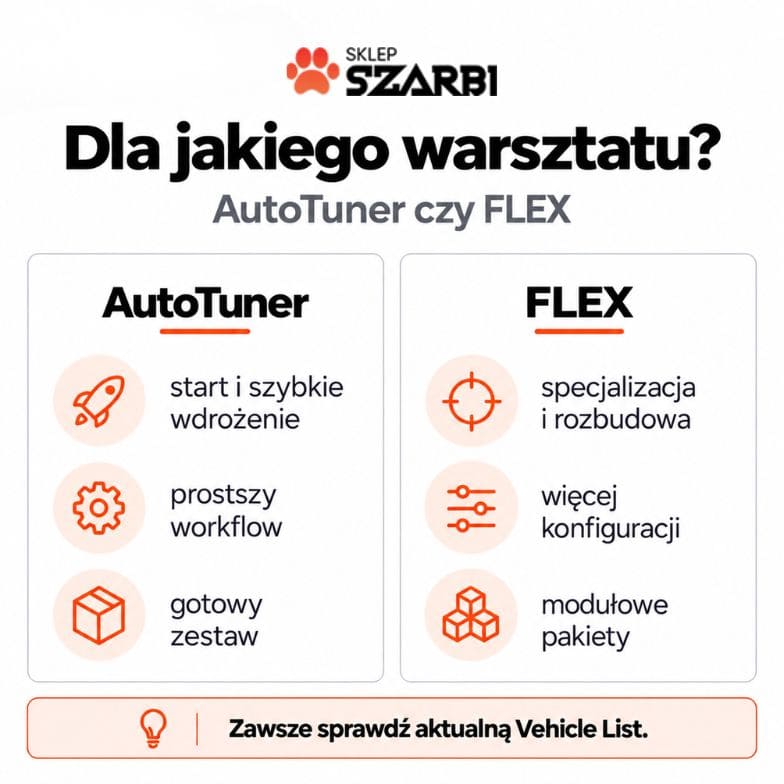
This can matter for a workshop that is starting out with ECU work and wants one complete workstation right away.
However, this does not mean AutoTuner will automatically be the best choice for every beginner. If the cars you work on are better covered by specific FLEX protocols, the compatibility list matters more than ease of purchase.
When can FLEX's modular model offer an organisational advantage?
FLEX is particularly interesting when you want to develop your workstation in stages or specialise in specific types of controllers and vehicles.
An example is the separate heavy-duty package FLS0.15, which covers ECU, TCU and DCU protocols for trucks, buses, agricultural machinery, construction equipment and other industrial vehicles. [9]
In another workshop, the TCU package may make more sense. Yet another might start with ECU OBD/Bench and only later move on to a more complete configuration.
FLEX also offers a wide range of dedicated cables and accessories for more specialised applications. [5]
In everyday workshop practice: modularity is only an advantage when you know what you need. Before buying FLEX, list the ECUs, TCUs and vehicle types you plan to work on, then check which packages actually cover them.
Case study: AutoTuner or FLEX for the Continental SID212?
The Continental SID212 is a good illustration of how quickly the capabilities of both tools change, and why any comparison must be based on up-to-date data.
The SID212 TC297 ECU is found in, among others, selected Fords with EcoBlue engines.
Previously, working with it required additional unlocking procedures. However, both systems have continued to evolve.
In June 2026, Magic Motorsport released the FLEX 7.59.0.0 update, which enabled direct support for SID212 and SID212EVO via OBD without a prior Bench unlock. The manufacturer lists reading and writing of Maps and Internal EEPROM. [10]
AutoTuner now also documents the SID212 with direct OBD support without a prior unlock. The current protocol description lists Normal Read and Virtual Read, writing, checksum correction and a restore-to-stock function. [11]
So what does this mean?
Not that “they are both the same”.
For a specific ECU, you should compare:
- the scope of data read,
- Normal Read vs Virtual Read,
- EEPROM,
- backup,
- Bench or Boot availability,
- the recovery procedure,
- operation time,
- required licences.
The SID212 also shows that a comparison made a year earlier could have led to completely different conclusions.
Is it worth choosing a tool based on update speed?
The pace of protocol development matters, but a single new update should not decide the entire purchase.
AutoTuner regularly releases newly supported ECUs; in September 2026 alone, the manufacturer announced new protocols for Continental and Bosch units, among others. [12]
FLEX is also actively updated. In August 2026, Magic Motorsport released new solutions for, among others, BMW/Mini MDG1, VAG MG1CS111, Ford MD1CP061 and Stellantis electric vehicle controllers. [13]
In practice, what matters more is whether the manufacturer is developing support for the ECUs relevant to your specialisation.
A workshop focused on VAG may assess updates differently from a business working with Ford, motorcycles or heavy-duty vehicles.
FLEX or AutoTuner for chip tuning – what about map editing?
Neither AutoTuner nor FLEX should be treated as a substitute for calibration expertise. The tool is primarily responsible for communicating with the ECU and handling the file.
AutoTuner states explicitly that separate software for handling binary files is required to modify the read data yourself. [1]
Within the Magic Motorsport ecosystem, the FLEX tool can work with the manufacturer's other solutions, but here too, simply having access to the file does not automatically mean a correct calibration.
If the workshop does not edit files in-house, it can use ECU files – internal link: /k/pliki-ecu/.
A proper process also requires diagnostics before and after writing. For this purpose, it is worth choosing the right diagnostic tools – internal link: /k/narzedzia-diagnostyczne/.
AutoTuner or FLEX for a new workshop?
For a new workshop, the ability to safely handle the first few dozen real jobs matters more than the name of the device.
If you value a simple cost model, a complete basic kit and no standard annual subscription for updates, the AutoTuner programmer is worth a close look. [1][2]
If, on the other hand, you know from the start that your workstation will be expanded modularly to cover different vehicle groups, TCUs, specialised processors or heavy-duty applications, the FLEX package architecture may be the practical choice. [5][9]
In the SZARBI range you can compare, among others, the AutoTuner MASTER and SLAVE variants with FLEX Master configurations and the more extensive FLEX Full Master packages. Match the version to your workflow first, and only then look at the price of the device itself.
AutoTuner or FLEX for an established workshop?
In an established workshop, the decision is usually based on ECU coverage, the cost of downtime and the ability to maintain several parallel workflows.
A large workshop may conclude that it shouldn't choose just one system.
If one platform handles certain ECUs better, while the other offers broader coverage for selected TCUs or specialised applications, two programmers can complement each other.
This is especially important when a car sitting in the bay costs more than owning a second tool.
That's why a professional comparison of ECU programmers should take into account not only price, but also:
- coverage of the ECUs you actually work on,
- availability of an alternative communication method,
- backup and recovery,
- TCU coverage,
- how quickly new platforms are supported,
- availability of technical support,
- the cost of waiting for a solution.
How do you ultimately choose between AutoTuner and FLEX?
First compare your list of ECUs and TCUs, then the licensing model, and finally the purchase cost.
Prepare a simple table for your own workshop:
| Question | What to check? |
|---|---|
| Which cars do I work on? | The 20–30 most common models |
| Which ECUs do I come across? | Specific ECUs and TCUs |
| How do I work? | OBD, Bench, Boot |
| Do I need backup? | Check per protocol |
| Master or Slave? | Who prepares the files |
| How much does expansion cost? | Licences, subscriptions, accessories |
| What are my plans? | Passenger cars, TCU, heavy-duty, electronics |
Only then does the question AutoTuner or FLEX start to make technical sense.
There is no single programmer that will automatically be right for every workshop. There is, however, a tool that is better or worse suited to a specific list of ECUs and way of working.
FAQ – AutoTuner or FLEX?
Both systems are professional ECU and TCU programming tools, so many of their core functions overlap. The differences only become significant for a specific way of working.
Do AutoTuner and FLEX support OBD, Bench and Boot?
Yes. Both systems support these methods. Exact availability and the scope of reading and writing depend on the specific ECU or TCU protocol. [1][5]
Does AutoTuner require a subscription?
The manufacturer states that there is no mandatory subscription for standard updates of the main tool and new protocols. This does not mean that all additional services across the entire ecosystem are free of charge. [2]
Does FLEX require a subscription?
Magic Motorsport's terms provide for an annual subscription fee after the first year. Its cost depends on the software configuration, and some services require an active subscription. [6]
Does AutoTuner have Master and Slave versions?
Yes. The Master works with unencrypted files, while the Slave is linked to a specific Master. [3]
Does FLEX have Master and Slave versions?
Yes. In FLEX, too, the Master and Slave model is tied to how files are handled and to the user network. [5]
Does FLEX support TCU?
Yes. FLEX offers both TCU protocols and dedicated packages covering automatic transmission control units. [8]
Does AutoTuner support TCU?
Yes. AutoTuner is a tool for reading and writing ECUs and TCUs. [1]
Does FLEX have a larger database than AutoTuner?
Declared vehicle counts alone are not a sound basis for such a conclusion. Manufacturers may count models, variants and protocols differently. Compare specific ECUs and TCUs.
Is AutoTuner better for beginners?
It may be simpler in terms of its update model and standard equipment, but the choice should be driven primarily by compatibility with the vehicles your workshop services.
Can a professional workshop use AutoTuner and FLEX at the same time?
Yes. The tools can complement each other if their compatibility lists and protocol coverage differ for the control units that matter to a given workshop.
Sources:
[1] AutoTuner, AutoTuner Tool – ECU/TCU, OBD, Bench, Boot and kit contents, accessed: 21.09.2026
URL: https://www.autotuner.com/products/autotuner-tool
[2] AutoTuner Help Center, No subscription, free updates, accessed: 21.09.2026
URL: https://help.autotuner.com/en/articles/6340621-no-subscription-free-updates
[3] AutoTuner Help Center, What’s the difference between Master Tool and Slave Tool?, accessed: 21.09.2026
URL: https://help.autotuner.com/en/articles/2984985-what-s-the-difference-between-master-tool-and-slave-tool
[4] AutoTuner Help Center, Backup file, accessed: 21.09.2026
URL: https://help.autotuner.com/en/articles/2984015-backup-file
[5] Magic Motorsport, FLEX – ECU and TCU Programmer, accessed: 21.09.2026
URL: https://www.magicmotorsport.com/en/flex/
[6] Magic Motorsport, FLEX Warranty Terms, accessed: 21.09.2026
URL: https://www.magicmotorsport.com/en/terms-conditions-warranty/flex-warranty-terms/
[7] Magic Motorsport, FLEX Vehicle List, accessed: 21.09.2026
URL: https://www.magicmotorsport.com/en/flex-vehicle-list/
[8] Magic Motorsport, FLEX Bench Support for VAG Bosch DQ500 Gen2, DQ38x and ZF AL552, accessed: 21.09.2026
URL: https://www.magicmotorsport.com/en/flex-bench-support-for-vag-bosch-dq500-gen2-dq38x-and-zf-al552/
[9] Magic Motorsport, New FLEX Software License for Heavy-Duty Vehicles, accessed: 21.09.2026
URL: https://www.magicmotorsport.com/en/new-flex-software-license-for-heavy-duty-vehicles/
[10] Magic Motorsport, FLEX for SID212/SID212EVO – No Unlock, accessed: 21.09.2026
URL: https://www.magicmotorsport.com/en/flex-sid212-sid212evo-no-unlock/
[11] AutoTuner, Continental SID212 – No More Unlock Needed, accessed: 21.09.2026
URL: https://www.autotuner.com/blogs/news/continental-sid212-no-more-unlock-needed
[12] AutoTuner, News and releases, accessed: 21.09.2026
URL: https://www.autotuner.com/blogs/news
[13] Magic Motorsport, FLEX – updates and system information, accessed: 21.09.2026
URL: https://www.magicmotorsport.com/en/flex/


